Node palette (left)
The capabilities you can add — Observe, Source, Transform, Validate, Decide, Approval, Publish and domain nodes — dynamically reflecting what the current runtime supports.
Fabric Studio is the standalone visual composer where production experts design, inspect, test and package agents in domain language — no hand-editing JSON. The suite contains two independent apps: Studio authors local drafts and signed packages; Fabric owns installation, trust, commissioning and execution authority.
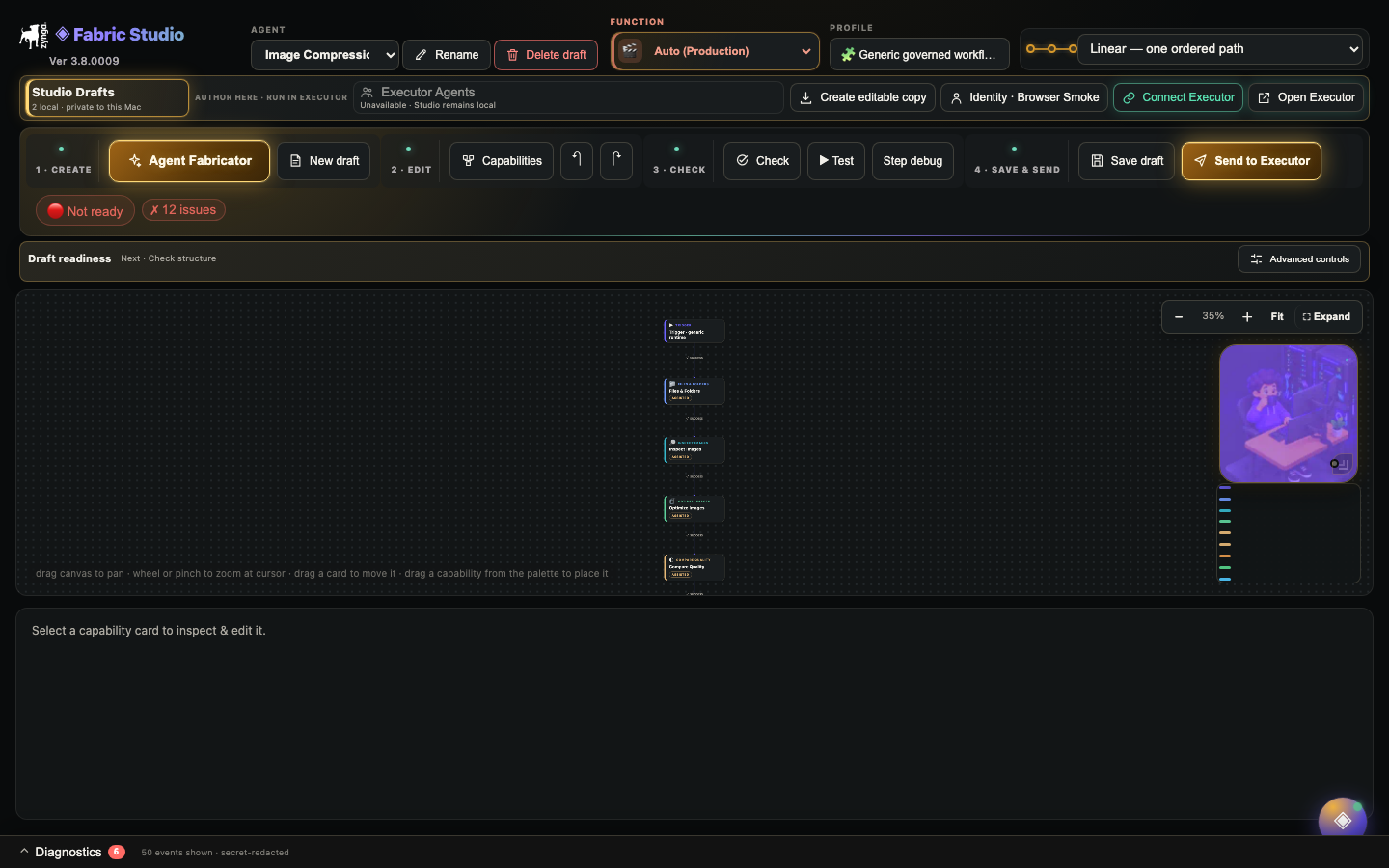
Layout
The capabilities you can add — Observe, Source, Transform, Validate, Decide, Approval, Publish and domain nodes — dynamically reflecting what the current runtime supports.
The agent as a graph: drag to add, connect stages, insert or delete nodes, and repair a broken flow. The spine shows execution order.
Per-node configuration: label, type, execution mode, inputs/outputs, policies, validators and evidence — tabbed and contract-aware.
Modes
A human performs the step; Fabric records it and hands off honestly. Used where no safe automated executor exists yet.
Fabric Intelligence performs the step through a real capability (vision QA, grounded drafting, reasoning), always grounded and confidence-scored.
A deterministic executor runs the step (Photoshop JSX, Unity bridge, Perforce sync, data write) — only if the executor registry supports its mode and runtime.
AI is the default execution mode wherever a genuine capability exists — but it never fabricates success and never replaces the human approval gate. A step with no safe executor is an honest manual hand-off, not a faked “done”.
Workflow
Author with AI uses an installed local Ollama model to propose changes with cited references and clarification questions. Manual draft opens templates and a deterministic request form. Review and apply the exact proposal; Studio never auto-publishes it.
Choose registered capabilities, supported execution modes and meaningful inputs. Standalone Studio currently authors an ordered linear workflow; arbitrary DAG execution is not available here.
Contract checks and structural simulation explain draft readiness. Supported AI-authored phrase verifiers also run positive and negative disposable fixtures through the shared validator; this does not qualify the full workflow.
Save the local draft, export its signed package, or explicitly send it to a connected Executor. A newly authored draft is installed disabled and must pass Executor admission. Valid independently certified imports with satisfied dependencies can be ready for manual governed runs.
Local intelligence
Open Author with AI → Model setup, discover local Ollama models, select one and enable authoring. Studio does not download models or use cloud inference. Models that delegate to a remote service are rejected. Studio and Executor share local inference admission; 48 GB Macs need memory headroom for creative apps and sequential model use.
Knowledge accepts short SOPs, skills, examples and references. Local text matching retrieves relevant sources with fingerprints. Decisions stores explicit project choices; changed source references make a decision stale. This is separate from Executor run memory and RAG.
Select a saved draft, describe its inputs and intended outcome, then answer clarification questions. Studio permits at most two proposal attempts using canonical validation and supported fixture-test errors. Review field differences and explicitly apply; a stale saved revision is rejected.
Evaluations repeats requests against expected capabilities or clarification. Reports retain measured outcomes, timings and source references. They never apply drafts or certify workflow execution.
Enable team review in Model setup for separate Requirements and Verification reviewers plus one relevant Architecture, Capability, Vision-planning or Recovery specialist. Up to three reviewers run sequentially. Context lookup, compilation and capability-gap requests remain shared services. Blockers prevent applying a proposal; these reviews never certify agent execution.
Select an optional fallback model for bounded inference or validation failures. Conversations show the actual model and specialist findings. Create → Check & test → Save & send stays visible; Advanced retains detailed readiness and secondary controls. Cancelling never applies a proposal.
Standalone handoff
Studio Drafts are private authoring state. They never load definitions from Pipeline-Repo, and connected Executor agents appear in a separate read-only catalogue. Clone an Executor definition when you want a new editable draft; the live installed definition is never edited in place.
Start blank, clone a read-only Executor agent, or use Import as Draft. Package import verifies the signed bytes and creates a unique editable copy without installing anything.
Structural checks and no-write simulation expose unsupported capabilities and contract gaps without granting runtime authority.
Send to Executor first shows the exact signed package digest and trust preview. Installation requires a separate confirmation.
Executor binds the installed package to its exact revision, verifies any retained independent certification, and shows the next governed action. A new uncertified draft stays disabled/decommissioned; an eligible independently certified import may become ready for manual governed runs when its dependencies pass. Automatic routing, commissioning and production effects remain separate.
Release approvals are now server-owned and resume automatically after the server-side review is complete. The UI continues to distinguish handoff, package review, installation, certification review, release preparation and execution evidence as separate steps with separate evidence. Studio can author and sign a portable definition, but it cannot copy credentials, memory, commissioning state or execution authority into that package. A successful handoff is not a successful run.
Trust
Preview verifies capability-to-executor coverage and shows proposed reads and writes. Studio simulation produces an explainable draft-readiness result without live writes. A high score never makes an unsupported or outward action safe: Executor policy, validation, approval, certification and commissioning gates remain binding.
Studio checks structure, package integrity and no-write behavior. Executor independently verifies the signature and compatibility, evaluates whether the import qualifies for manual runs, and applies its own capability, credential, approval and commissioning policy.
Intelligence Profiles v1.2.0 prove an agent's readiness across workspaces — resolved capabilities, installed/enabled knowledge, sealed runtime skill manifests, and required-tool readiness. Skills (48 from .claude/skills) follow a knowledge-vs-executable contract: RAG-ready guidance immediately, execution bound and sealed by version + digest at run start — no silent drift.
Reuse & recovery
Start new agents from templates; reuse proven node groups as components. Treat a component like shared production code — narrow contracts, versioned changes, retest every consumer.
Saved draft versions provide visual diff and rollback, so every authoring change is reviewable and reversible before export.
Flow breaks (use Repair flow), unsupported AUTO stages (pick a supported mode/executor), low source coverage (add grounding sources).
Inspect the missing requirement or capability. The AI workspace can repair a proposal using concrete validation feedback; the manual request form is deterministic. Neither creates missing tool implementations. Provide authoritative inputs, revise the draft or implement and qualify the missing capability.
Connected Executor agents are read-only in Studio. Clone one into a new local draft, review the differences, test without writes, then send a new signed version through Executor trust.
Check and test each replacement draft, then let Executor qualify it through its own governed lifecycle. Keep the previous installed version available until the replacement has passed that sequence.
Federation
Exporting a signed agent package lets another workstation import a credential-safe copy pinned to the exact authored version. Studio does not silently mutate installed copies; every replacement is a new package reviewed and accepted by Executor.
Dependency changes create a new draft and package. Installed agents stay pinned until an operator reviews and imports the replacement in Executor.
If the upgrade changes the dependency's input/output contract, the upgrade is blocked until you map the boundary. Remap-preview auto-maps same-name, same-type fields and lists exactly which inputs and outputs still need an explicit mapping or default; the reviewed plan is digest-bound and travels with the draft.
Studio never accepts caller-supplied certification or commissioning state. Executor verifies independent retained certification when present; commissioning and runtime effects remain locally governed.
Consumers of a changed dependency receive retryable cross-workspace notices tracked in a durable delivery ledger: pending → delivered, or failed with bounded retry and dead-lettering after five attempts. Reconciliation re-attempts every outstanding notice, so a transient outage never drops a consumer.
The connected Executor catalogue is read-only. Export a checksum-sealed forge.agent-package.v1 bundle containing the portable graph, profile metadata and permitted skills; credential-shaped fields and runtime authority are stripped.
The standalone lifecycle is Build → Check → Test → Resolve → Save → Package → Executor. Executor then applies independent trust, certification and commissioning before any live run.
Reference
.forge-agent package with an authorized signing setup. Do not embed credentials, private history or runtime state.Reference
Studio’s developer signature attests to package bytes. Independent Fabric Intelligence certification is separate evidence for the exact workflow. Executor verifies any retained attestation and applies its own installation, compatibility, policy, credential and commissioning checks. A self-entered score, successful simulation or exported ZIP grants none of those gates.
Previously imported certified packages can be re-exported only through the verified retained-package path when eligible. Editing the draft does not preserve certification for the changed revision.
Reference
Test runs a no-write draft simulation. Certify directs you to connect, save and send the draft to Executor; it does not issue certification. Agent updates opens the connected Executor, where Import agent accepts a reviewed signed replacement package from the same trusted developer. Automatic capability refresh is unavailable: edit the draft, then Check and Test it. Delete local draft removes only the selected saved draft after confirmation and rejects stale revisions; its saved version history and installed Executor agents are retained.
Runtime replay, learning, evaluations and commissioning belong to Executor. A saved draft or successful simulation does not make an installed agent ready for production.
A trusted package with valid independent Fabric Intelligence certification and satisfied dependencies can become ready immediately for manual governed runs, without a second commissioning step. Automatic routing and production-effect authority remain disabled. Other valid imports stay disabled/decommissioned until their admission requirements are met. Unknown, invalid or revoked signatures are quarantined.